Develop and Publish With Poetry
I’ve been trying to publish my packages to PyPi so people can access my software more easily. But I have to be honest, Python’s publishing system is not the best out there and it has to improve quite a lot.
Wandering around I stumbled upon Poetry, which is a python packager and dependency manager created by Sébastien Eustace for people that doesn’t want to lose their head managing a Python project.
Let’s say that we want to make a small command line application that checks the status of a web page, let’s call it checkstat. So how can we create, develop, and publish our software with Poetry?
Installing Poetry
Installing Poetry is really easy with Pip.$ pip install poetry
Now we are able to see Poetry’s options.
$ poetry |
Creating our package and add dependencies
First we have to create our package with the new command, this will create a file structure that we can modify later.
# Create a new package |
As we can see, the only argument needed to create a directory structure for our little project is the argument new followed by our project’s name. This will also generate a template for our project called pyproject.toml which is used as a replacement of the most feared (at least by me) setup.py.
[tool.poetry] |
As you can see, it describes basic information about the project, dependencies and development dependencies. We will get back to the TOML file shortly.
What we want to do next is to create the virtual environment of our project and install the development dependencies with the command install.
# Create package isolated virtualenv and install dependencies |
Now that we have installed the requirements and initiated the virtual environment let’s add more libraries to our project, shall we? Let’s add Click, Colorama and Requests.
# Add more requirements |
There you go, now if we check the our pyproject.toml again, you can see that it has the new package dependencies.
[tool.poetry.dependencies] |
Developing our module and our CLI
Now we’re ready to develop our checkstat module and command line interface. Let’s start by making a test with Pytest. For this, let’s open test_checkstat.py inside our tests folder.
Here we’re going to set an expectation. Our module checkstat should have a method called is_up which should return True if the webpage returns the code 200 for any other code it should return False. Here’s the test:
import checkstat |
Now if we run this test with pytest it will show red because we haven’t build any modules yet, but for the sake of demonstration, let’s show the red test first.
# Running our test |
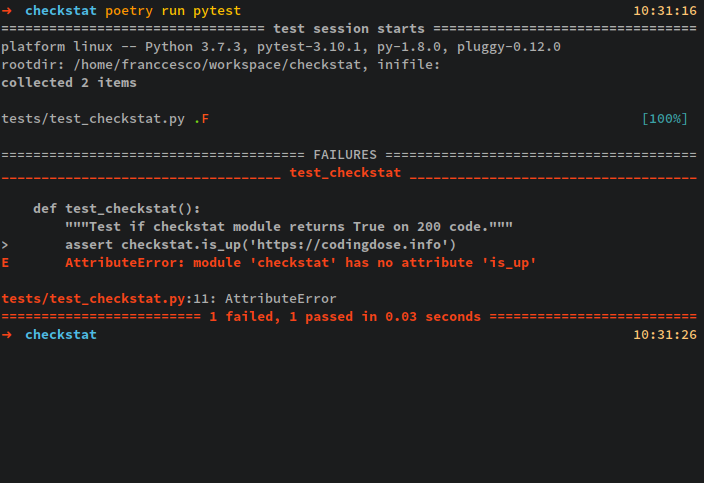
Now, let’s build the module shall we? Let’s make a file called checkstat.py under the checkstat directory and define a is_up method that returns True if the webpage is reachable and returns a 200 HTTP code.
# checkstat/checkstat.py |
Now let’s add our module to our initialization package so it gets correctly loaded.
# checkstat/__init__.py |
Let’s re-run our test to see if its passing now.
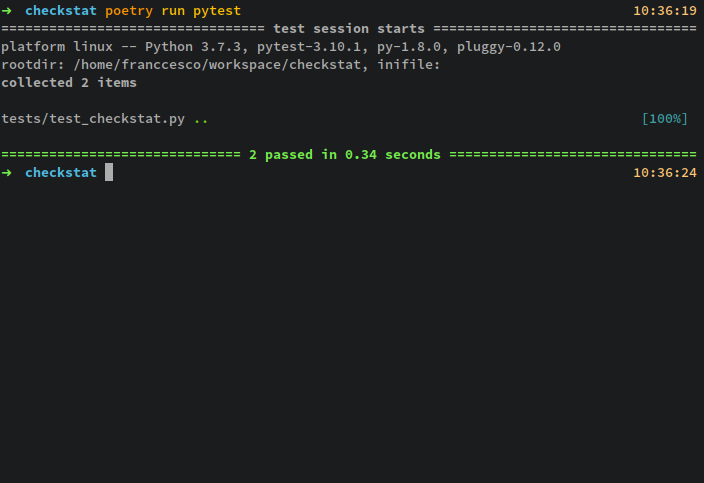
Perfect, now that our test is passing we can go ahead and make our command line script. Let’s create a file called cli.py inside our checkstat folder.
# checkstat/cli.py |
Perfect, now we have completed our CLI, but we haven’t tried it yet, how do we make it run on the terminal without calling python x_file.py? Easy-peasy, let’s edit the pyproject.toml and add a script section.
[tool.poetry] |
What does checkstat.cli:main means? It means: Hey python, whenever I type checkstat I want you to execute the function main() inside of the module cli.py in the package checkstat. Now we must tell Poetry that we want install the package in develop mode.
This “develop” mode is useful because this way, every time we edit our package, be our CLI or module, we wouldn’t have to install the package again and again; We can see our changes reflected right away in execution.
$ poetry develop |
Now that our package is installed in our virtual environment and we have set a script for it, we can execute it directly with Poetry.
Let’s check the status code of another web page that returns a 500 Internal Error code.
Awesome! Our little command line application is ready to be published.
Publishing our tool
Publishing our tool to the PyPi is really effortless, let’s try to do it right now. First of all we have to build our package.
$ poetry build |
Now we have to upload it to the pypi.org repository.
$ poetry publish |
And that’s it! Our tools is now available to anyone using pip to install packages. Let’s check it out: https://pypi.org/project/checkstat/
Installing our tool
Let’s go and install our tool to see if it’s available now.
Collecting checkstat |
And let’s execute it.
It works!
Conclusion
I hope you like the entry, today we have learn how to create, develop and ship a very basic CLI. If you have any issues in the process remember to comment below. Have fun!